












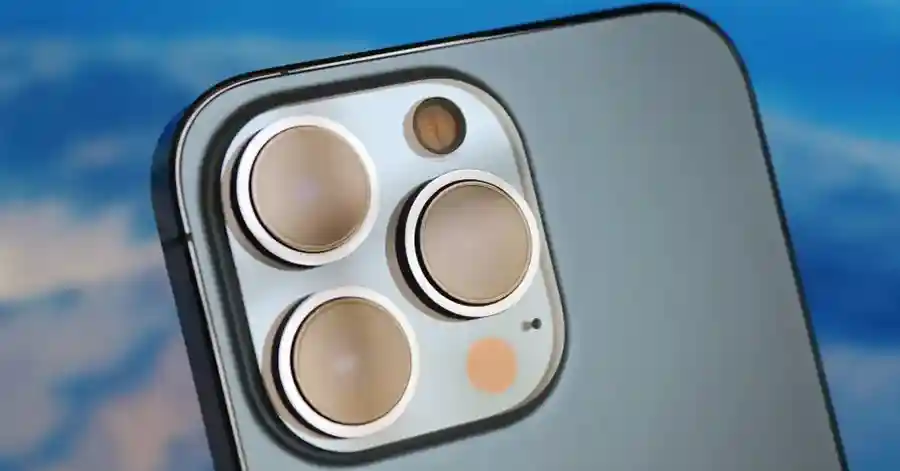
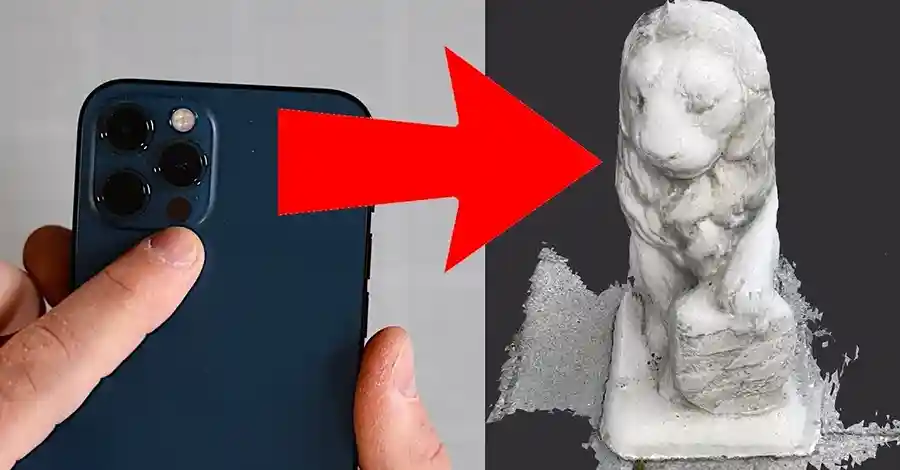
Have you ever noticed a small black circle positioned near the camera lenses on your iPhone Pro model and wondered what it does? Many iPhone users assume it’s another camera lens or perhaps a flash component, but this mysterious black dot is actually one of the most powerful yet underutilized features on modern iPhones: the LiDAR scanner.
The LiDAR scanner represents cutting-edge technology that transforms your iPhone into a sophisticated 3D mapping device capable of measuring distances, scanning rooms, enhancing photography, and powering immersive augmented reality experiences. Despite its remarkable capabilities, most iPhone users remain completely unaware of this feature’s existence or how to leverage its full potential.
Understanding LiDAR Technology: Light Detection and Ranging Explained
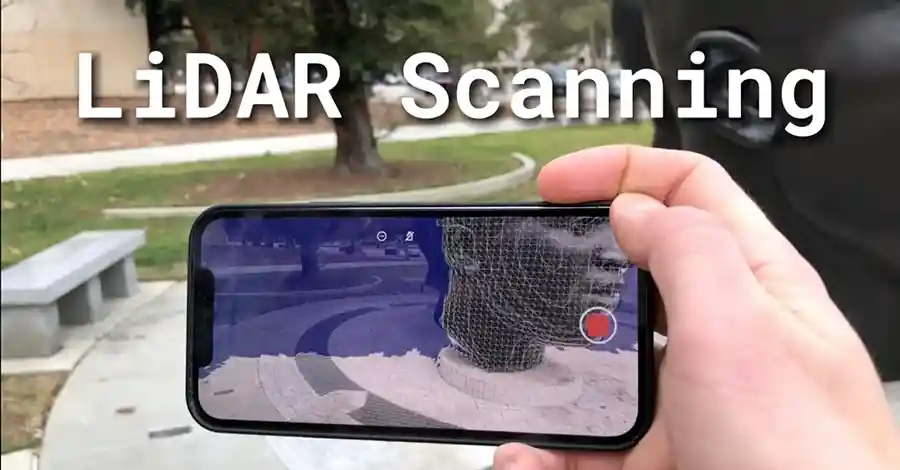
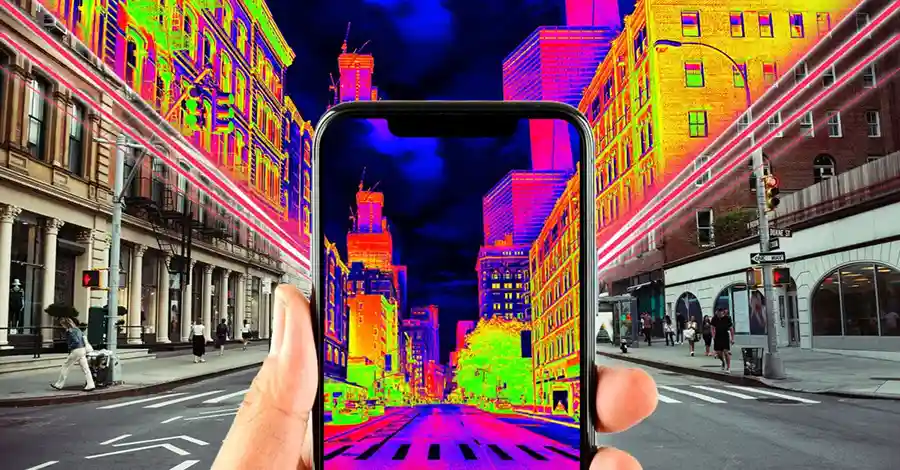
LiDAR stands for Light Detection and Ranging, a remote sensing technology that creates highly accurate three-dimensional representations of physical environments. The iPhone’s LiDAR scanner operates by emitting hundreds of thousands of invisible infrared light pulses every second and measuring how long each pulse takes to bounce back after hitting nearby objects.
How iPhone LiDAR Scanner Works
The technology functions similarly to radar but uses light waves instead of radio waves, enabling much more precise measurements over shorter distances. According to Mappedin’s technical analysis, LiDAR creates highly accurate 3D representations by emitting infrared light pulses and measuring their return time to calculate distances to objects.
When these light pulses strike surfaces in your environment—walls, furniture, people, or any other objects—they reflect back to the sensor. The scanner calculates distances based on the speed of light and the time differential between emission and reception. This process happens so rapidly that your iPhone can build a complete three-dimensional point cloud map of your surroundings in real-time.
Key Technical Specifications:
- Range: Up to 5 meters (16.4 feet)
- Light wavelength: Infrared (invisible to human eyes)
- Pulse frequency: Hundreds of thousands per second
- Integration: Works automatically with compatible apps
- Safety: Classified as safe for eyes and skin
The beauty of this system lies in its seamless integration. Unlike many smartphone features requiring manual activation, the LiDAR scanner operates automatically when needed, particularly when you launch the camera app in low-light conditions or use compatible augmented reality applications.
Which iPhone Models Have LiDAR Scanner?
Apple first introduced LiDAR technology to mobile devices with the 2020 iPad Pro models before bringing it to iPhones. The feature remains exclusive to Pro-level devices, maintaining its status as a premium differentiator in Apple’s product lineup.
iPhone Models with LiDAR Scanner:
- iPhone 12 Pro and iPhone 12 Pro Max (2020)
- iPhone 13 Pro and iPhone 13 Pro Max (2021)
- iPhone 14 Pro and iPhone 14 Pro Max (2022)
- iPhone 15 Pro and iPhone 15 Pro Max (2023)
- iPhone 16 Pro and iPhone 16 Pro Max (2024)
iPad Models with LiDAR Scanner:
- iPad Pro 11-inch (2nd generation and newer)
- iPad Pro 12.9-inch (4th generation and newer)
If you’re unsure whether your device includes this technology, simply look at the camera module on the back of your iPhone or iPad. The LiDAR scanner appears as a small black circle positioned near the camera lenses, typically in the bottom right corner of the camera array on Pro models.
Standard iPhone models—including base iPhone 12, 13, 14, 15, and 16, as well as iPhone SE and iPhone mini variants—do not include LiDAR scanners. This hardware limitation means certain advanced features remain exclusive to users who invest in Pro-level devices.
1. Revolutionary Low-Light Photography and Faster Autofocus
One of the most impactful yet invisible uses of the LiDAR scanner involves dramatically improving your iPhone’s camera performance in challenging lighting conditions. Traditional smartphone cameras struggle with autofocus in darkness because they rely on contrast detection, which requires sufficient light to identify focus points.
How LiDAR Transforms Night Photography
The LiDAR scanner solves this fundamental limitation by providing accurate distance measurements independent of lighting conditions. When you launch the Camera app in low light, the LiDAR scanner activates automatically, mapping your environment and determining precise distances to subjects.
Apple claims that the LiDAR scanner can determine the distance to objects and enable the camera’s autofocus to work six times faster than smartphones without this technology. This dramatic improvement means you can capture sharp, well-focused images in near-darkness where other phones would produce blurry, unusable results.
Low-Light Photography Benefits:
- Instant focus lock even in near-total darkness
- Reduced shutter lag for spontaneous moments
- Improved Night mode portrait photos
- Better depth mapping for Portrait mode effects
- Enhanced detail preservation in shadows
The scanner works silently in the background, requiring no user intervention or special settings. You’ll notice the difference most dramatically when photographing subjects in dimly lit restaurants, at evening events, or during nighttime outdoor photography where traditional autofocus systems fail.
Night Vision Applications
Beyond photography, dedicated apps like Night Vision – LiDAR Scanner and LiDAR & Infrared Night Vision leverage this technology to create functional night vision capabilities. These applications illuminate objects using the LiDAR’s infrared pulses, enabling enhanced visibility in low-light conditions that would otherwise be completely dark to the human eye.
2. Precise Object and Distance Measurement Using Built-In Measure App
The iPhone’s built-in Measure app transforms your device into a surprisingly accurate digital tape measure, and LiDAR technology elevates this functionality to professional-grade precision. While the Measure app exists on all recent iPhones, LiDAR-equipped models deliver substantially more accurate and reliable results.
Using Measure App with LiDAR Enhancement
According to Apple’s official support documentation, the Measure app uses augmented reality technology to turn your device into a tape measure, and with supported Pro devices, you can measure objects more easily with visible guides and measurement history.
Step-by-Step Measurement Process:
- Open the Measure app (pre-installed on all recent iPhones)
- Point your camera at the object you want to measure
- Move your device slightly to establish spatial reference
- A circular reticle with a center dot appears on screen
- Position the dot at your measurement’s starting point
- Tap the “+” button to set the first point
- Move to the measurement’s end point
- Tap “+” again to complete the measurement
- The distance appears on screen with remarkable accuracy
Advanced LiDAR-Exclusive Features:
- Automatic rectangular object detection
- Instant height measurement for people
- Yellow guide lines that snap to edges
- Measurement history across sessions
- Area calculations for surfaces
- Diagonal measurements for rectangles
The LiDAR scanner enables measurements accurate within 1% over distances up to 3 meters, making it genuinely useful for home improvement projects, furniture shopping, space planning, and countless other practical applications where you’d traditionally need a physical tape measure or laser distance meter.
Real-World Measurement Applications
Professional contractors, interior designers, and DIY enthusiasts increasingly rely on iPhone LiDAR for preliminary measurements. While it shouldn’t replace professional surveying equipment for critical applications, it provides more than adequate precision for everyday tasks like determining whether furniture fits through doorways, measuring wall dimensions for artwork placement, or calculating room areas for flooring estimates.
3. Complete 3D Room Scanning and Floor Plan Creation
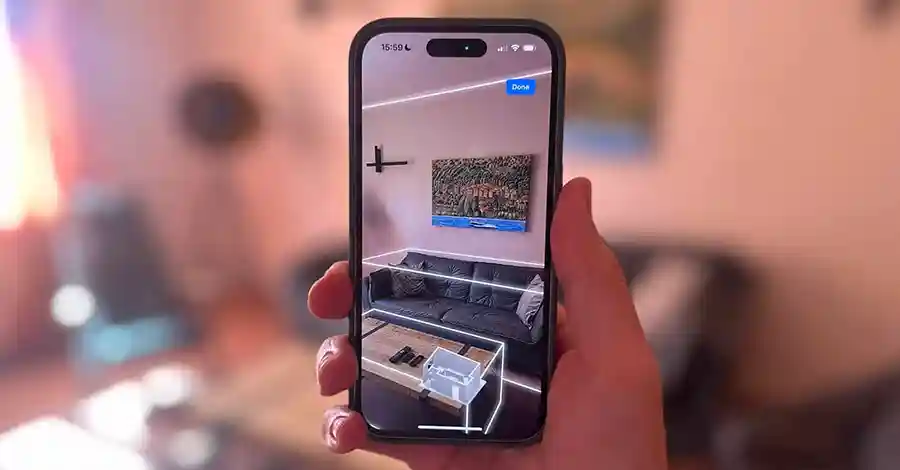
Perhaps the most impressive capability of the LiDAR scanner involves creating detailed three-dimensional models of entire rooms or buildings using nothing but your iPhone. This technology democratizes 3D scanning, making capabilities once requiring expensive specialized equipment accessible to anyone with a Pro-level iPhone.
Best Apps for Room Scanning with LiDAR
Canvas: Pocket 3D Room Scanner Canvas stands out as one of the most powerful room scanning applications, specifically designed to leverage LiDAR technology for professional-quality results. The app creates highly detailed 3D models and accurate 2D floor plans that can be exported to CAD software for architectural or design work.
Polycam – LiDAR & 3D Scanner Polycam has earned recognition as a top-rated application for creating 3D models, offering built-in model sharing with the Polycam community where users share everything from ice cream to extensive sneaker collections. The app provides intuitive crop controls that allow removal of background objects even if you make scanning mistakes.
magicplan magicplan specializes in creating detailed floor plans with automatic object detection. According to the app’s documentation, magicplan’s LiDAR Auto-Scan uses Apple’s RoomPlan API to capture not only room dimensions but also detect objects within the room, mapping multiple rooms, furniture, and structural objects without exiting the scanning session.
RoomScan LiDAR RoomScan focuses specifically on real estate applications, enabling property professionals to create professional-quality property listings with accurate floor plans and 3D walkthroughs.
Scanning Process and Best Practices
Optimal Scanning Technique:
- Start in one corner of the room
- Hold your iPhone at chest height, parallel to the floor
- Walk slowly around the room’s perimeter
- Point the camera at walls, floors, and ceilings
- Include all major furniture and fixtures
- Move smoothly without jerky motions
- Ensure adequate lighting throughout the space
- Complete the scan by returning to your starting point
Most apps provide real-time visual feedback showing which areas have been successfully scanned and which require additional coverage. The entire process typically takes 2-5 minutes per room depending on size and complexity.
Use Cases for 3D Room Scanning:
- Real estate listings and virtual tours
- Interior design planning and visualization
- Renovation planning and contractor communication
- Insurance documentation
- Moving and furniture placement planning
- Architectural documentation
- Historical building preservation
- Space utilization analysis for businesses
4. Virtual Furniture Shopping: Try Before You Buy
One of the most practical consumer applications of LiDAR technology involves visualizing furniture and home decor items in your actual living space before making purchase decisions. This capability addresses the age-old problem of buying furniture that looks perfect in showrooms but disappoints when delivered to your home.
How AR Shopping Works with LiDAR
Major retailers have embraced augmented reality shopping experiences, and LiDAR significantly enhances the accuracy and realism of these virtual placements. The scanner creates precise spatial maps of your room, ensuring virtual furniture respects real-world physics—items appear correctly sized, positioned on proper surfaces, and interact realistically with existing objects.
IKEA Kreativ Integration IKEA pioneered AR furniture shopping with its Place app and has since evolved to IKEA Kreativ, integrated directly into the main IKEA app. According to industry analysis, IKEA Studio utilized LiDAR technology specifically, with its Scene Scanner using LiDAR to scan environments and learn where floors and walls are positioned to accurately place objects in three-dimensional space.
The app even allows you to digitally remove your existing furniture and design entire rooms using IKEA’s catalog, providing remarkably accurate previews of how your space could look after redecoration.
Amazon AR View Amazon’s mobile app includes AR View functionality that works exceptionally well on LiDAR-equipped devices. Browse thousands of products—from sofas and coffee tables to lamps and decorative accessories—and place virtual versions in your home with realistic scaling and positioning.
Wayfair View in Room 3D Wayfair offers one of the most extensive AR furniture catalogs, allowing you to place thousands of items in your space. The LiDAR scanner ensures proper sizing, so that massive sectional sofa you’re considering won’t surprise you by overwhelming your living room.
Benefits of AR Shopping with LiDAR:
- Accurate size representation prevents costly mistakes
- Visualize multiple arrangement options instantly
- Compare different furniture styles side-by-side
- Avoid items that clash with existing decor
- Share room designs with family before purchasing
- Reduce return rates and environmental impact
This technology has proven particularly valuable during the pandemic era and beyond, enabling confident online shopping when visiting physical stores isn’t practical or convenient.
5. Enhanced Augmented Reality Gaming Experiences
Gaming represents one of the most exciting applications of LiDAR technology, enabling truly immersive augmented reality experiences where virtual elements interact believably with your physical environment. The scanner’s ability to understand room geometry, identify surfaces, and track spatial positioning creates gaming experiences impossible on non-LiDAR devices.
LiDAR-Powered AR Games
Hot Lava Hot Lava brilliantly demonstrates LiDAR’s gaming potential by transforming your living room into a fiery obstacle course where you interact with virtual elements in the real world and dodge molten lava. The game uses environmental mapping to place lava flows that realistically navigate around your furniture, creating dynamic challenges unique to your space.
LIDAR.dark This first-person shooter takes place in darkness and leverages the LiDAR sensor to see around real-world obstacles. The game creates a unique gaming experience where your actual physical environment becomes the battlefield, requiring you to move around your space while engaging virtual enemies.
Angry Birds AR: Isle of Pigs This popular franchise adaptation uses LiDAR to superimpose a virtual island on your real-world environment. The enhanced spatial understanding ensures pig structures appear stable and realistic, with destruction physics that account for nearby real-world surfaces.
AR Robot Players select mechanical champions that appear to battle in their actual homes, with robots that appear to break through walls and navigate real furniture. The LiDAR scanner ensures these interactions look convincing and maintain proper scale relationships.
Why LiDAR Matters for AR Gaming
Traditional AR experiences often struggle with spatial understanding, leading to virtual objects that float incorrectly, clip through real surfaces, or fail to maintain proper positioning when you move your device. LiDAR solves these problems by providing precise, real-time environmental mapping that enables:
- Virtual objects that cast realistic shadows on real surfaces
- Proper occlusion (real objects correctly block virtual ones)
- Stable virtual object anchoring that persists across sessions
- Realistic physics interactions between virtual and real elements
- Seamless blending of digital and physical spaces
As AR game development matures, expect increasingly sophisticated experiences that blur the lines between digital entertainment and physical reality, with LiDAR-equipped devices delivering the highest quality experiences.
6. Automatic Person Height Measurement
One of the most delightful LiDAR features involves instantly measuring a person’s height simply by pointing your iPhone camera at them. This functionality, integrated into the Measure app, demonstrates the scanner’s remarkable precision and practical utility.
How to Measure Someone’s Height
The process couldn’t be simpler:
- Open the Measure app on your LiDAR-equipped iPhone
- Point your camera at a person standing upright
- Ensure their entire body from head to feet appears in frame
- The measurement appears automatically above their head
- Tap the shutter button to capture a photo with the measurement
- Results display in both feet/inches and centimeters
According to BGR’s testing, when the Measure app detects a person in the viewfinder, it automatically measures their height from the ground to the top of their head, hat, or hair, with the ability to tap the shutter button to take a photo of the person with their height measurement.
Practical Applications:
- Tracking children’s growth over time
- Determining proper clothing sizes for online shopping
- Athletic performance documentation
- Medical and health monitoring
- Creating accurate 3D character models
- Settling friendly height debates
The feature works remarkably well under most conditions, though accuracy depends on proper positioning. For best results, ensure the person stands on level ground with good lighting, maintains an upright posture, and keeps their entire body within the frame.
Limitations and Accuracy Considerations
While impressively accurate for casual use, the height measurement feature carries Apple’s standard disclaimer that “measurements are approximate.” Testing by various reviewers suggests accuracy within ±1-2 centimeters under ideal conditions, making it suitable for everyday purposes but not clinical or legal applications requiring certified measurements.
7. Professional Applications: Architecture, Education, and Healthcare
Beyond consumer conveniences, LiDAR technology on iPhones has found serious professional applications across multiple industries, democratizing access to capabilities once requiring expensive specialized equipment.
Architectural and Construction Uses
Architects and contractors increasingly use iPhone LiDAR for preliminary site surveys, existing condition documentation, and client presentations. The ability to quickly capture accurate spatial data directly from a phone eliminates the need for carrying additional equipment to every site visit.
Professional Workflow Integration:
- Export scans to CAD software (AutoCAD, SketchUp, Revit)
- Create as-built documentation for renovations
- Generate preliminary measurements for estimates
- Document existing conditions before demolition
- Verify construction progress against plans
- Create compelling client presentations
Apps like Canvas and Polycam offer professional export formats compatible with industry-standard software, enabling seamless integration into existing workflows. While iPhone scans shouldn’t replace professional surveying for construction documents, they provide more than adequate detail for early planning stages and client discussions.
Educational Applications
Science and medical education benefit enormously from LiDAR-powered AR applications. Complete Anatomy 2024, developed by 3d4medical, represents a prime example of educational innovation. The app allows a human body to be placed in an augmented reality scene in the real world and then digitally dissected to show individual components, their structures, and more.
Medical students can examine 3D anatomical models at actual life size in their physical environment, rotating around them and exploring internal structures in ways traditional textbooks or 2D screens cannot match. This immersive learning creates stronger spatial understanding and better knowledge retention compared to conventional study methods.
Healthcare and Physical Therapy
Healthcare professionals use LiDAR technology for range of motion assessments and rehabilitation tracking. The scanner’s precise measurements enable accurate documentation of joint mobility, posture analysis, and movement patterns critical for diagnosing conditions and monitoring recovery progress.
Physical therapists can capture baseline measurements at initial consultations and track improvements over treatment courses with objective data rather than subjective assessments. Some applications even provide automated analysis, identifying asymmetries or limitations that might escape visual observation.
How to Check If Your iPhone Has LiDAR Scanner
If you’re uncertain whether your specific iPhone model includes LiDAR technology, several methods can confirm its presence:
Visual Inspection Method: Turn your iPhone over and examine the camera module. On Pro models with LiDAR, you’ll see a small black circle positioned near the camera lenses, typically in the bottom right corner of the camera array. This circle is distinct from camera lenses—it’s flat black without the glass appearance of camera elements.
Settings Verification:
- Go to Settings > General > About
- Note your exact model number
- Cross-reference against the list of LiDAR-equipped models
Measure App Test:
- Open the Measure app
- Point at a person
- If automatic height measurement appears, you have LiDAR
- If it doesn’t, your model lacks the scanner
Camera Features Check: Take a photo in Portrait mode in very low light. If autofocus works quickly and accurately despite near-darkness, your device likely has LiDAR assistance.
Getting Started: Tips for Maximizing Your LiDAR Scanner
Now that you understand what your iPhone’s LiDAR scanner can do, here are practical tips for getting the most from this powerful technology:
For Photography:
- LiDAR activates automatically in low light—no settings needed
- Portrait mode in darkness now works reliably
- Focus lock happens almost instantly even in near-total darkness
- Night mode portraits show improved subject separation
For Measurements:
- Calibrate by moving your device around before measuring
- Use yellow guide lines that appear on straight edges
- Take multiple measurements and average for precision
- Screenshot measurements for future reference
For Room Scanning:
- Walk slowly and steadily for best results
- Ensure adequate lighting throughout the space
- Hold your phone at consistent chest height
- Overlap your scanning paths for complete coverage
- Avoid scanning reflective surfaces like mirrors
For AR Shopping:
- Clear clutter from the area you’re visualizing
- Ensure good lighting for accurate color representation
- Walk around virtual furniture to see all angles
- Try multiple placement options before deciding
- Share AR views with family members for input
Privacy and Security Considerations
As with any sensor technology, questions naturally arise about privacy and data collection. Apple has implemented several safeguards regarding LiDAR functionality:
What Data Gets Collected:
- LiDAR operates locally on your device
- Depth maps are processed entirely on-device
- No environmental scans are sent to Apple servers
- Third-party apps must request explicit permission
User Controls:
- Review app permissions in Settings > Privacy
- Revoke camera access to disable LiDAR usage
- Delete scans within individual apps
- Apps cannot access LiDAR without camera permission
The infrared light emitted by the LiDAR scanner is classified as Class 1 laser product, meaning it’s safe for eyes and skin under all reasonably foreseeable use conditions. The power levels are far below thresholds that could cause biological harm, and the scanning pattern doesn’t concentrate energy on single points.
Future of LiDAR Technology on iPhones
Apple’s integration of LiDAR into consumer devices represents just the beginning of this technology’s potential. Industry analysts predict several evolutionary developments:
Short-Term Expectations (1-2 Years):
- Expanded LiDAR to non-Pro iPhone models
- Increased scanning range beyond current 5-meter limit
- Improved accuracy and resolution
- Enhanced real-time processing capabilities
- More sophisticated AR applications
Medium-Term Possibilities (3-5 Years):
- Integration with Apple’s rumored AR/VR headset
- Advanced gesture recognition using spatial mapping
- Environmental context awareness for Siri
- Automated accessibility features for vision-impaired users
- Enhanced security and Face ID alternatives
Long-Term Vision:
- Persistent spatial anchors across devices
- Collaborative AR experiences with multiple users
- Real-time 3D video capture and transmission
- Holographic display technologies
- Integration with autonomous vehicle systems
As developers gain experience with LiDAR APIs and computing power continues advancing, expect increasingly sophisticated applications that leverage this technology in ways we haven’t yet imagined.
Conclusion: Unlocking Your iPhone’s Hidden Superpower
That mysterious black circle near your iPhone Pro camera represents far more than a minor hardware addition—it’s a gateway to capabilities that transform your device from a simple smartphone into a sophisticated 3D sensing instrument. From dramatically improved low-light photography to professional-grade room scanning, from immersive AR gaming to practical measurement tools, the LiDAR scanner delivers tangible benefits across countless use cases.
Most iPhone Pro users remain completely unaware of this technology’s existence or potential applications. By understanding what the LiDAR scanner does and exploring the apps that leverage its capabilities, you can unlock features that genuinely differentiate Pro models from standard iPhones and discover practical uses that enhance your daily life.
Whether you’re a photography enthusiast seeking better low-light performance, a homeowner planning renovations, a gamer craving immersive experiences, or simply someone curious about technology, your iPhone’s LiDAR scanner offers tools worth exploring. That small black circle represents a significant leap forward in mobile sensing technology—it’s time to put it to work.

Economic Affair
- Budhigandaki Flood: 47 Rescued as Bridges Washed Away
- Nepal Supreme Court Handcuff Order: Police Barred From Routine Use
- 250+ Officials Deploy to Assess Rasuwa-Bhotekoshi Flood Damage
- Electricity VAT: Energy and Finance Ministers Strike Landmark Deal After Just 2 Months
- Nepal Inflation Shockingly Triples to 5.96% — Food and Transport Hit Hardest







Comments